Comparison
Facility EHR vs Practice EHR.
RPM and CCM programs operate in two distinct care environments — facilities (senior living, skilled nursing) and physician practices — each with different EHR systems, workflows, and integration requirements. Understanding these differences is critical for implementation planning.
Side by Side
Feature comparison.
Analysis
Key differences.
Census-driven vs. encounter-driven workflows
Facility EHRs track residents continuously — ADT events, daily charting, census changes. Practice EHRs are organized around discrete patient encounters. This affects how RPM enrollment is triggered and how data flows between systems.
Enrollment automation
Facility integrations can leverage census sync to automatically identify and enroll eligible residents. Practice integrations typically require a physician order or care manager action to initiate RPM enrollment.
Billing entity differs
In facility settings, the billing structure may involve the facility, the attending physician, or a managing provider. In practice settings, the ordering physician's practice typically handles billing directly.
Guidance
When to use each.
Facility EHR integration when
Operating RPM/CCM in senior living, skilled nursing, assisted living, memory care, or CCRC environments. The integration should support census sync, ADT monitoring, and multi-resident workflows.
Practice EHR integration when
Operating RPM/CCM through physician practices, outpatient clinics, or health systems. The integration should support encounter-based enrollment, problem list sync, and practice-level billing workflows.
FAQ
Common questions.
Can one RPM platform support both facility and practice EHRs?
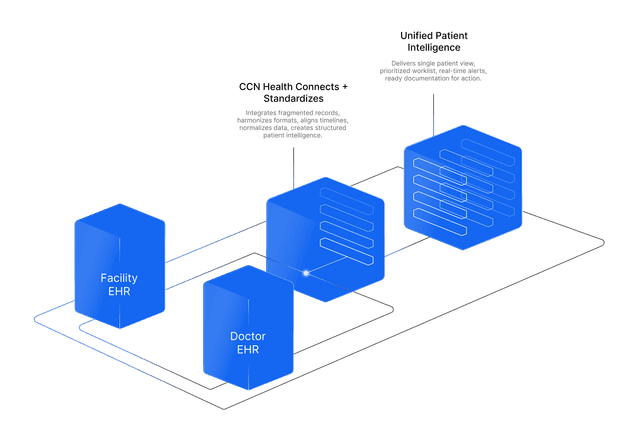
Yes. CCN Health integrates with both facility EHRs (PointClickCare, ALIS, MatrixCare) and practice EHRs (athenahealth, Epic, Charm Health) through a unified platform. This is important for organizations that span both care settings.
Which EHR type has faster implementation?
Implementation timelines depend on the specific EHR and organization size. Generally, practice EHR integrations may be faster for single-site deployments, while facility EHR integrations can scale more efficiently across multi-site operators through census sync automation.
Do billing codes differ between facility and practice settings?
The CPT codes are the same regardless of setting. However, the billing entity and workflow differ. In facilities, the billing relationship involves the attending or managing physician. In practices, the ordering physician typically bills directly.
More Comparisons
Also compare.
CCM vs RPM
Compare Chronic Care Management (CCM) and Remote Patient Monitoring (RPM): billing codes, patient eligibility, reimbursement, and when to use each.
CGM vs Glucose Meter
Compare continuous glucose monitors (CGMs) and traditional glucose meters for remote patient monitoring: data frequency, cost, patient experience, and clinical use cases.
RPM vs RTM
Compare Remote Patient Monitoring (RPM) and Remote Therapeutic Monitoring (RTM): CPT codes, eligible conditions, device requirements, and when to use each program.
BHI vs CCM
Compare Behavioral Health Integration (BHI) and Chronic Care Management (CCM): eligibility, billing codes, clinical workflows, and when to combine both programs.
RPM + CCM
Learn how to combine RPM and CCM for the same patient to maximize revenue and clinical outcomes. Requirements, billing rules, and implementation best practices.
RPM + BHI
RPM + BHI combined stacking for patients with chronic physical and behavioral health conditions. Billing rules, revenue potential, and compliance guidance.
CCM + BHI
CCM + BHI combined stacking for patients with chronic physical and behavioral health conditions. Billing requirements and revenue potential.
RPM + RTM
RPM + RTM combined stacking for patients with physiologic and therapeutic monitoring needs. Billing restrictions, revenue potential, and compliance.
RPM + PCM
Learn how to combine RPM and PCM for patients with a single complex chronic condition. Billing rules, revenue stacking, and key difference from CCM.
CCM + RTM
CCM + RTM combined stacking for the same patient. Billing rules, revenue estimates, eligible patient profiles, and compliance requirements.
CCM + PCM
CCM and PCM cannot be billed for the same patient in the same month. Why they are mutually exclusive, how to choose, and when to switch.
BHI + RTM
BHI + RTM combined stacking for the same patient. Billing rules, revenue estimates, and implementation guidance for behavioral and therapeutic care.
PCM + RTM
Learn how to combine Principal Care Management (PCM) and Remote Therapeutic Monitoring (RTM) for the same patient. Billing rules, eligible conditions, revenue estimates, and implementation best practices.
Cellular vs Bluetooth
Compare cellular and Bluetooth blood pressure monitors for remote patient monitoring: data reliability, patient experience, connectivity, and clinical outcomes.
Contactless (Radar) vs Wearable Devices
Compare radar-based contactless monitoring with traditional wearable RPM devices: patient experience, data types, compliance, and ideal care settings.