integration-guides
DS Smart + PointClickCare: Turning Vitals Into RPM
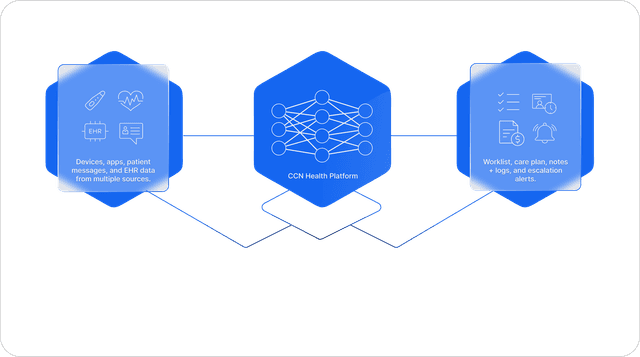
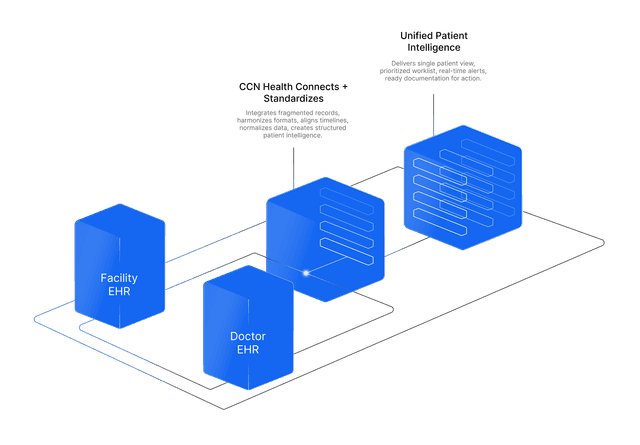
A resident's health story lives in two charts. DS Smart captures vitals into PointClickCare, CCN Health reads them and runs the RPM and CCM program, and the physician side is documented to the practice EHR. One capture, both records.
DS Smart, Direct Supply's vitals capture app for senior living, writes resident readings to PointClickCare. CCN Health's live PointClickCare integration reads those vitals, runs physician backed RPM and CCM programs on them, and documents the physician side to the practice EHR, so one capture serves both the facility chart and the practice chart.
One Resident, Two Charts
Every resident in a senior living or skilled nursing community has a health story that lives in two places at once.
The first half lives in the facility EHR, usually PointClickCare: the daily record of vitals, medications, notes, and care that community staff maintain. The second half lives in the practice EHR: the chart the resident's physician works from, at a practice that may never log in to PointClickCare at all.
The two halves describe the same person, and most of the time they do not talk to each other. Vitals captured by a CNA on the morning rounds stay in the facility chart. The physician who could act on a drifting blood pressure trend sees it at the next visit, if at all.
This article is about closing that gap with two systems that already exist: DS Smart® (a registered trademark of Direct Supply, Inc.) on the capture side, and CCN Health's PointClickCare integration on the monitoring side.
How Vitals Get Into PointClickCare
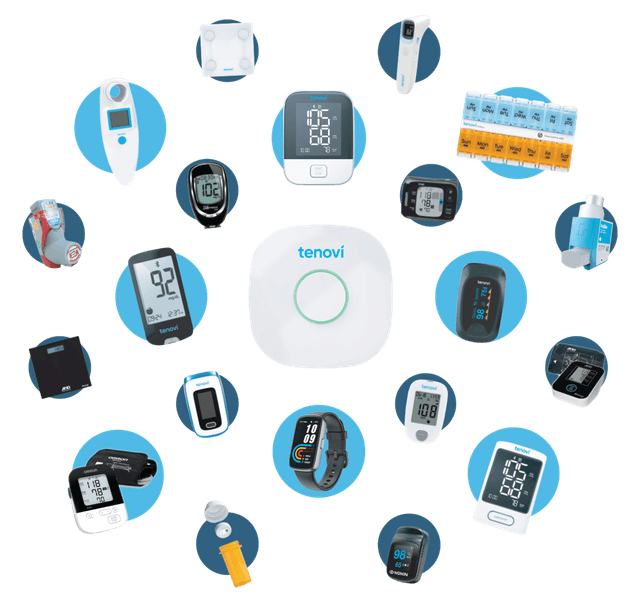
DS Smart is Direct Supply's vitals capture product for senior living: the DS smart app on a shared tablet or cart, paired with Bluetooth connected vital sign devices. The capture loop is short by design:
- A CNA opens the DS Smart app and signs in with their PointClickCare credentials. No separate DS Smart password is issued.
- The app pairs with the Bluetooth device, and the readings come across in real time. The CNA reviews and confirms them.
- One tap syncs the vitals to the resident's chart in PointClickCare.
That is the entire facility side contribution: the vitals your staff were already taking, now landing in the chart as structured data instead of pencil notes. If you are evaluating the hardware itself, the compatible monitors, scales, and supported EHRs are covered in our DS Smart vital sign machine buyer's guide.
What CCN Health Does With Them
CCN Health runs remote patient monitoring and chronic care management programs for senior living and skilled nursing populations, and its PointClickCare integration is live in production today.
Here is the honest description of the plumbing. CCN Health does not connect to the DS Smart app. It reads the facility EHR. DS Smart writes vitals to the PointClickCare chart, and CCN Health's integration picks them up from there. The chart is the handoff point, which means there is no extra interface to build, maintain, or break between the two vendors.
Once the vitals are flowing, the program on top looks like this:
- Trend monitoring. Readings are watched across time, not viewed one at a time. A blood pressure that is fine today but has climbed for three weeks gets flagged.
- Clinical review. CCN Health's clinical team reviews flagged readings and coordinates with the resident's physician practice, so an abnormal trend becomes an intervention rather than a data point.
- Program mechanics. RPM has Medicare requirements, like 16 days of readings per 30 day period for CPT 99454. CCN Health tracks which residents are on pace and where capture needs to tighten.
The Practice Side: Documentation Where Physicians Work
RPM and CCM are physician services. The doctors serving a community's residents chart in their own practice EHRs, and a program the physician cannot see in their own system is a program that gets ignored.
So the physician side of the work is documented to the practice EHR, with Athena Health, Charm Health, and Ethizo supported. Monitoring time, clinical review, and the documentation behind billing land in the chart the practice actually uses.
This is the dual EHR shape of the whole arrangement, and it is what makes the program work for both audiences at once:
| Who | Where they work | What they get |
|---|---|---|
| Community staff | PointClickCare | Vitals captured once on the DS Smart cart, charted automatically, trends watched by a clinical team |
| Physicians and practices | Athena Health, Charm Health, Ethizo | Monitoring documentation in their own EHR, a billable program, earlier signal on deteriorating patients |
| Residents | Both charts | The vitals they already give at the med pass turning into actual clinical monitoring |
A community that sets this up is serving both of its constituencies with the same workflow: the staff who run the building and the doctors who serve its residents.
Five Years of DS Smart Deployments
CCN Health has been working with DS Smart deployments for five years. That tenure matters more than any feature list: the capture to chart to monitoring pattern described here is not a roadmap item or a pilot, it is running quietly in production in communities today. The workflow questions that come up in a rollout, from credential setup to capture cadence, have been answered in real buildings on real carts.
Setting It Up
Going live is deliberately boring, and the step by step instructions live on dedicated pages rather than here. The order of operations:
- Activate CCN Health on your PointClickCare Marketplace.
- Activate DS Smart on your PointClickCare Marketplace, covered in DS Smart on PointClickCare.
- Sign in to the DS Smart app with your PointClickCare credentials. No separate password is issued.
Onboarding DS Smart with CCN Health walks the full sequence in order, and What is DS Smart is the page to send anyone seeing the capture workflow for the first time.
For the full picture of how CCN Health and DS Smart fit together, including the buyer's view of the hardware, visit the DS Smart partnership hub.
Your CNAs are already capturing the vitals. CCN Health reads them from PointClickCare and runs the physician backed monitoring program on top, documented to the practice EHR.
DS smart® is a registered trademark of Direct Supply, Inc. PointClickCare is a trademark of PointClickCare Technologies Inc. CCN Health is an independent company; references to third party products describe compatibility and do not imply sponsorship or endorsement by their owners.
This article is for informational purposes only and does not constitute medical, legal, or billing advice. Medicare billing requirements depend on program setup and clinical circumstances; consult qualified professionals for guidance specific to your community.
Let's figure this out together
We work closely with every client to find the right approach for their practice. Think of us as your partner, not just a platform.
Topics
Your Partner in Chronic Care
We love working closely with our clients to find the best solutions. Let us help guide you through the complicated stuff.
Continue Reading
Related Articles
Explore more insights on this topic.
DS Smart Vital Sign Machine: 2026 Buyer's Guide
A buyer's guide to the DS Smart vital sign machine. The app and cart setup, the compatible monitors and scales, the EHRs it writes to, and how CCN Health turns the captured vitals into a physician backed remote patient monitoring program.
Best PointClickCare RPM Integration: The Complete 2026 Guide
A complete guide to integrating Remote Patient Monitoring with PointClickCare — covering API architecture, bi-directional data flows, automated vital sign charting, and how CCN Health turns PCC into a five-program Medicare revenue engine.
Remote Patient Monitoring for Senior Living — 2026 Guide
How Remote Patient Monitoring works in senior living communities — device deployment, wellness-focused monitoring, EHR integration with ALIS and August Health, and Medicare billing for independent and assisted living settings.
Common Questions
Frequently Asked Questions
Get answers to the most common questions about this topic.
Yes. PointClickCare is one of the facility EHRs DS Smart writes to, per Direct Supply. On a PCC community, staff sign in to the DS Smart app with their existing PointClickCare credentials, capture vitals over Bluetooth, and sync them to the resident's PCC chart. The integration is activated through the PointClickCare Marketplace.
No. On a PointClickCare community, staff open the DS Smart app on the facility tablet or mobile device and sign in with the same PointClickCare credentials they already use. No separate DS Smart password is issued.
Through the facility EHR. CCN Health maintains a live PointClickCare integration that reads vitals from the resident's chart after DS Smart writes them. CCN Health does not connect to the DS Smart app itself; the chart is the handoff point between the two systems.
CCN Health documents the physician side of RPM and CCM programs to Athena Health, Charm Health, and Ethizo. The practice sees the monitoring work in its own system rather than in a separate portal, while the facility keeps its record in PointClickCare.
They can support a physician backed program. Once the vitals are in PointClickCare, CCN Health runs the RPM program on them, tracks whether each resident's capture frequency meets Medicare requirements such as the 16 days of readings per 30 day period behind CPT 99454, and prepares the documentation the practice bills from. Eligibility depends on each resident's coverage and clinical circumstances.
Three steps: activate CCN Health on your PointClickCare Marketplace, activate DS Smart on the Marketplace, then sign in to the DS Smart app with PCC credentials. The step by step walkthroughs live on the CCN Health setup pages for onboarding DS Smart.
Still have questions? We love helping practices figure this out — no pressure, just real answers.

Your Partner in Chronic Care
We're Here to Guide You Every Step of the Way
RPM, CCM, and chronic care management can get complicated. We work closely with every client to figure out the best solutions for their practice.