
Onboarding DS Smart with CCN Health
The full order of operations for getting DS Smart live with CCN Health: activate both applications on PointClickCare, then log in to DS Smart with your PCC credentials.
Order of operations
Both applications have to be activated on your PointClickCare Marketplace before anyone can log in to DS Smart. Work through these in order.
Step 1. Activate CCN Health on your PCC Marketplace
Submit the Marketplace activation request for CCN Health RPM.
Step 2. Activate DS Smart on your PCC Marketplace
Submit the Marketplace activation request for DS Smart powered by direct supply.
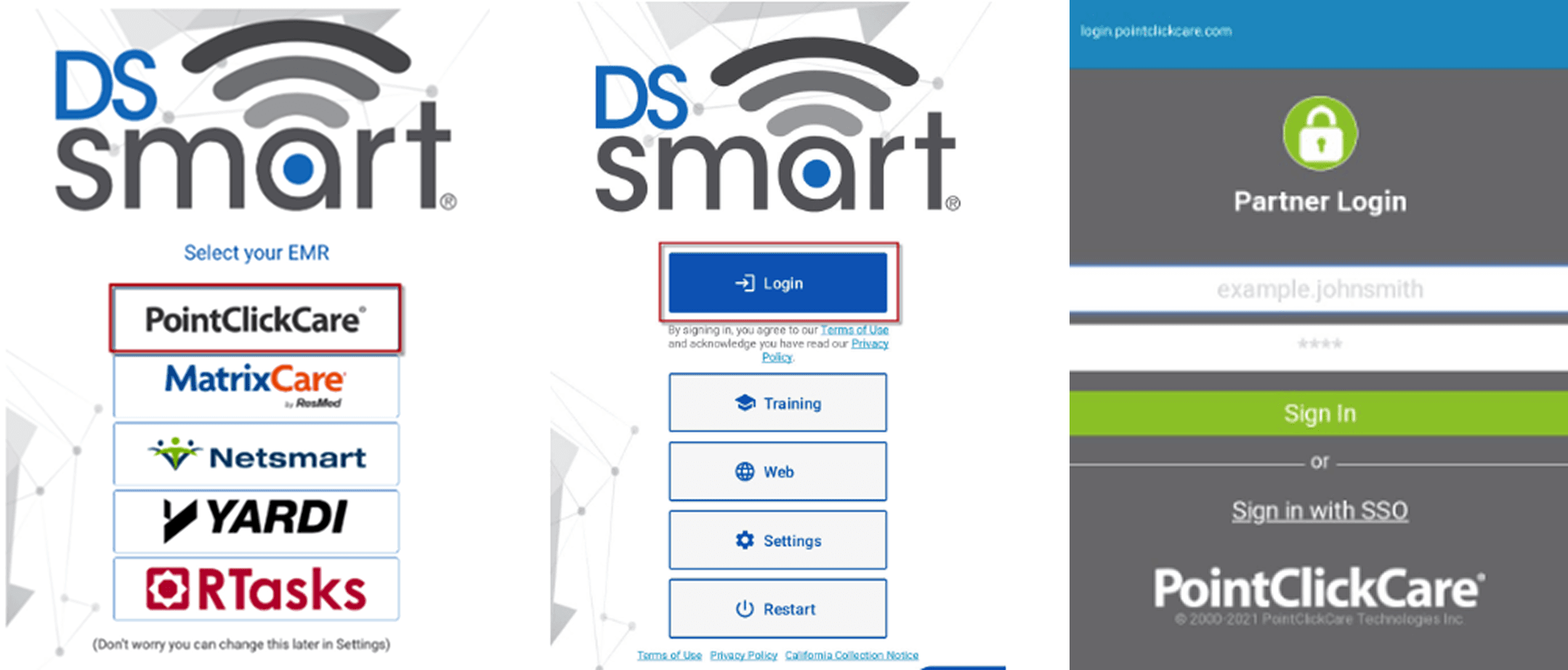
Step 3. Log in to DS Smart with your PCC credentials
On the facility iPad or Android device, open the DS Smart app and sign in using the same PointClickCare credentials. No separate DS Smart password is issued.
Screens to navigate in DS Smart