A CNA signs into the DS Smart app on the facility tablet with their PointClickCare credentials.
No separate DS Smart password to issue, rotate, or forget. The PointClickCare login is the login.
The tablet lives on the vitals cart. Whoever is on shift signs in, and DS Smart checks the credentials with PointClickCare.
How it works
What happens
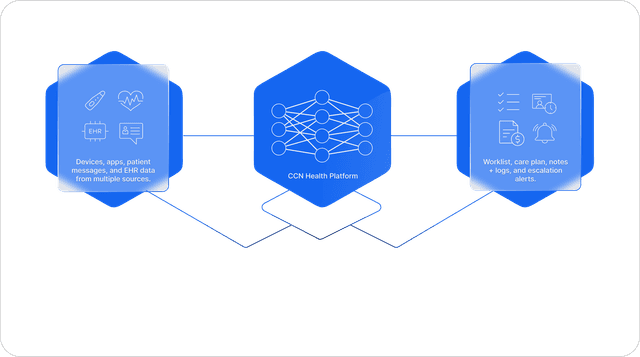
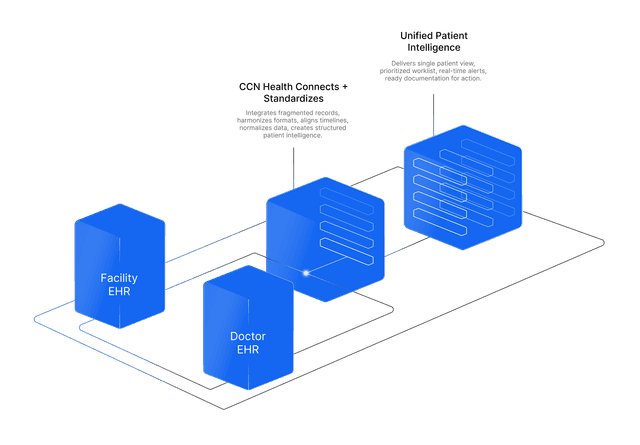
Vitals capture in a senior living community is a cart job: a CNA signs into the DS Smart app on the shared facility tablet with their PointClickCare credentials, takes the resident's vitals with the cart's Bluetooth devices, and confirms each reading in the app. The confirmed reading writes to the resident's PointClickCare chart with a timestamp. CCN Health's live PointClickCare integration picks it up from there: the resident is enrolled in a CCN RPM program, the readings trend, and when a pattern turns concerning, like blood pressure rising across a week, the CCN clinical team flags it. The physician who serves the building's residents gets the documentation in their own EHR, Athena Health in this story, through CCN's practice-side integration.
How it works
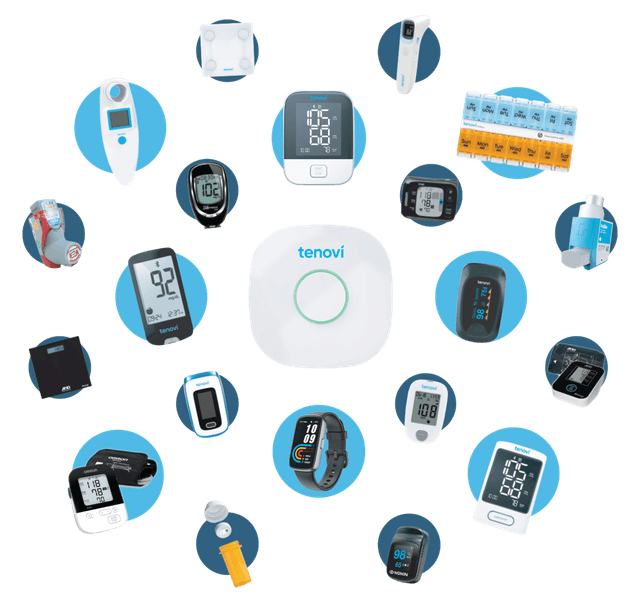
DS Smart is Direct Supply's Bluetooth vitals capture product: an app on a shared facility tablet that authenticates with the user's PointClickCare credentials (no separate DS Smart password is issued) and pairs with Bluetooth vitals devices, families like Welch Allyn Connex monitors and Detecto scales, for blood pressure, pulse ox, temperature, and weight. Confirmed readings post to the resident's PointClickCare chart. CCN then reads the chart's new observations through the Partner API (GET .../observations), matches them to the resident, deduplicates, and trends them against the resident's thresholds in the RPM program. When the clinical team documents a flagged trend, CCN's practice-side EHR integration files that documentation to the physician's chart, so the practice works from its own system.
The benefit to your practice
One capture at the cart serves everyone downstream. The facility charts without transcription, the monitoring team sees the trend instead of a single number, and the physician's practice gets its documentation in the EHR it already runs. CCN serves both sides of senior living care, the building and the doctors who care for its residents, and DS Smart is the capture layer that starts the whole flow. The two work beautifully together.
What you get
- The DS Smart app signs in with PointClickCare credentials, so there's no separate password to manage
- Bluetooth vitals capture at the cart: blood pressure, pulse ox, temperature, weight
- Each reading is reviewed and confirmed in the app, then written to the resident's PointClickCare chart with a timestamp
- CCN's live PointClickCare integration pulls the reading into the resident's RPM program and trends it
- A concerning trend is flagged by the CCN clinical team and documented to the physician's EHR through CCN's practice-side integration