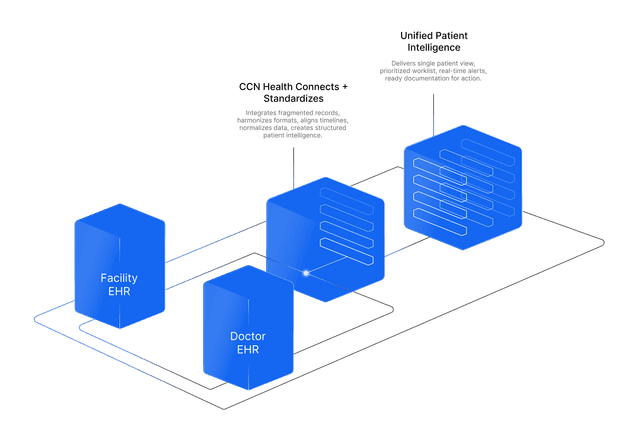
Rosa's record lives in Charm Health. That is where it should live, and it stays there.
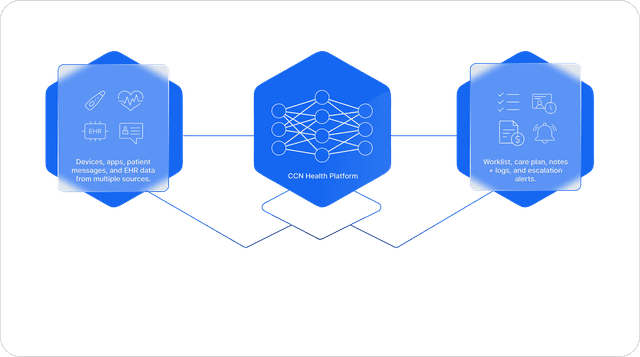
CCN reads the chart where it lives instead of copying it, so there is never a second version to reconcile.
 ·Patient Chart
Rosa Delgado
MRN 04412 · Internal Medicine · Dr. Kim
Rosa's record
1 chart
on the Charm Health chart
How it works
What happens
Through the same authorized connection, CCN retrieves the patient's Charm Health record and keeps CCN's demographics current with it. As the practice enables additional access, medications and diagnoses surface in CCN too, so the monitoring team works with the clinical context the chart already holds.
How it works
CCN reads the patient record, medications, and diagnoses endpoints of the Charm Health EHR API under the practice's OAuth authorization, on the same token and permission set that powers vitals, messaging, and documents. Data renders read-only and clearly sourced; CCN mirrors the chart, it never forks it.
The benefit to your practice
One authorized connection, granted once, powers everything: vitals in, messages both ways, documents filed, and a profile that never drifts from the chart. There is no second system to keep in sync by hand.
What you get
- Demographics kept current from the Charm Health record
- Medications & diagnoses, available as access is enabled
- One authorized connection powers vitals, messaging, documents, and record access