Why we built this
Monitoring a full panel shouldn't mean hunting. It should mean the work coming to you.
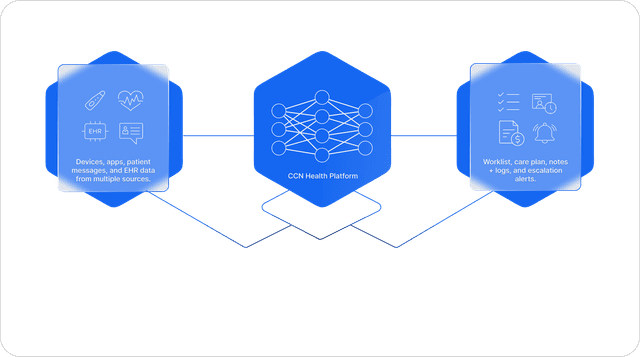
Every patient is pre-computed for triage, every vital drawn against the patient's own healthy range, every out-of-range reading surfaced with one-tap resolution, every minute captured automatically, and every CPT code computed as the data lands. The dashboard does the deciding and the documenting, so a monitor spends their time on the patients who actually need it, not on finding them.
The fundamentals
The essentials, handled.
Before the deeper features, the basics are already covered: time captures itself, every minute is attributed to the staff who logged it, your notes are templated, and patients can see their own record.
Automatic time capture
A monitoring timer auto-starts and submits the session when you leave. No stopwatch, no manual tally.
Time tracked per staff
Every minute is attributed to whoever logged it, so you see who did what.
Note templates, per account
One-tap canned clinical text, configured to your team's language and protocols.
Patients can log in
Patients get a secure login to view their own readings, so they stay in the loop.
The patient roster
Every RPM patient on one screen, pre-computed for instant triage. Each row carries the patient's compliance and monitoring state (monitored time, reading days, latest reading, device status), so a monitor scans the whole panel and jumps straight into whoever needs attention.
- Custom-status tags · RPM time · reading days · latest reading with an “Unseen” badge · device-status pill
- Summary stats (patient count, patients without a device) + include/exclude quick filters
- Every column sortable & searchable; Create Patient or Import from Athena / CharmHealth; CSV export
- Row → the patient's chart; a Workflows tasks bar turns the roster into guided queues
 ·Patients · RPM
Every column sortable & searchable · quick-filter by custom status · row → the patient's chart.
Per-patient vitals charts
The heart of the dashboard. Nine interactive vital charts plot a patient's readings over any range, each drawing the patient's own healthy-range band: in-range vs out-of-range color-coded, events overlaid, a hard Crisis flag on BP. The fastest way to see how someone's doing.
- Blood Pressure, Glucose (meal-aware), Weight, SpO₂, Temperature, Sleeping HR, Respiratory, PoBC…
- A green healthy-range band from the patient's thresholds; out-of-range readings marked red
- Glucose Time-in-Range %, weight change, dual-axis SpO₂ + HR, events/notes on the timeline
- Thresholds resolve per patient first, then account defaults; charts export PDF / CSV / PNG
·Chart · Margaret ReyesReal-time out-of-range alerts
Any reading outside a patient's thresholds becomes an alert; the latest one surfaces at the top of the chart with one-tap resolution that can auto-write the documentation note. The same alerts feed the out-of-range report and the scheduled alert emails.
- A pulsing alert: “an out-of-range [vital] reading of [value] was recorded in the last 7 days”
- One-tap Resolve, or Resolve-With-Note (auto-writes the note)
- Feeds the Out-of-Range report + daily AM/PM and weekly alert emails
- Thresholds are per-patient, so the alert fires on what's abnormal for this patient
·Chart · Margaret ReyesAn out-of-range Blood Pressure reading of 168 / 98 mmHg was recorded in the last 7 days.
The same alerts feed the Out-of-Range report and the scheduled alert emails. Resolve once, documented everywhere.
Devices: cellular or a multi-device hub
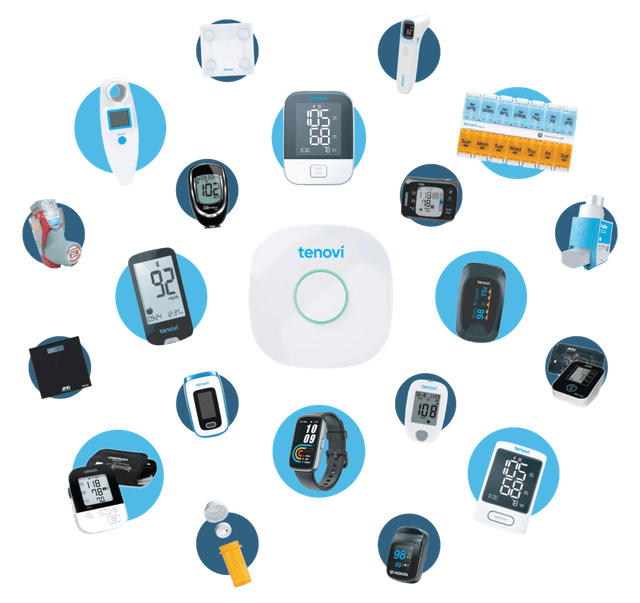
Assign a cellular or Bluetooth device by serial, or a Tenovi multi-device hub with per-modality toggles. Real-time serial validation, connectivity tracking, and in-app ordering with fulfillment tracking.
- Single devices or a Tenovi hub (BP · Pulse Ox · Glucometer · Weight · Thermometer · Pillbox toggles)
- Real-time serial-format help; device status tracked from assigned → first reading
- Order devices in-app and view fulfillment / tracking
- Works with Tenovi, Withings, Dexcom, Smart Meter, Omron, Bodytrace, Jumper…
·Devices · Margaret ReyesHub modalities
Cellular or Bluetooth · single devices or a Tenovi multi-device hub · order & track fulfillment in-app.
Monitoring time & the timer
Care-time is captured three ways (an auto-running header timer that submits on exit, manual entry, and time logged alongside a note) and aggregates into the patient's total and the RPM billing minutes. No stopwatch on a sticky note.
- The timer auto-starts when the patient has readings and auto-submits the session on exit
- Manual entry (minutes/seconds + date + note) for offline time
- A Date · Staff · Duration log; a monthly total that feeds 99457 / 99458
- Time captured while you document, never separately tallied
·Monitoring · Margaret ReyesTime Spent Monitoring
2h 15m
this month → RPM billing
Live session
00:03:42
auto-submits on exit
Messaging: one-way, or two-way with your EHR
Staff message patients right from the chart. On its own, messaging is one-way: you send SMS reminders and nudges. Connect an EHR integration (CharmHealth) and it becomes two-way, so patient replies come back into the chart. Either way you get full history, quick-reply templates, and an AI-suggested reply.
- One-way by default: send SMS reminders and nudges from the chart
- Two-way with an EHR integration (CharmHealth): patient replies come back in
- Full history, staff / patient bubbles, a date-range filter
- Quick-reply chips + a highlighted AI-suggested reply
·Messaging · Margaret ReyesMaria R. · 9:12a
Margaret · 9:20a
Maria R. · 9:22a
One-way SMS on its own. With an EHR integration (CharmHealth) it goes two-way, so replies come back in.
Onboarding + EHR import
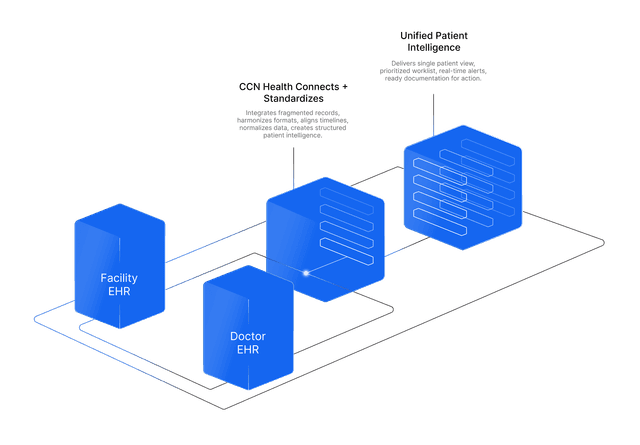
A guided five-step wizard stands a patient up end-to-end, or you can import demographics straight from athenahealth / CharmHealth. Either way the patient lands device-ready in minutes.
- Wizard: Patient (programs + consent) · Additional Fields · Reading Ranges · Staff · Devices
- Per-program switches (RPM / CCM / BHI / PCM / RTM) with a per-program consent date
- Import from Athena / Charm: demographics pre-filled, with “already imported” detection
- Lands on the Devices tab ready to assign a device (or the care plan for CCM)
·New Patient · OnboardingPrograms + consent
Five guided steps from create → live, or import a patient from the EHR and land on Devices ready to go.
RPM billing, computed live
A per-patient monthly billing view computes each RPM CPT code's status from readings and monitored time, and lets staff mark them billed, with bulk provider-sign and date-of-service tools for month-end.
- A status pill per code: 99453 setup · 99454 ≥ 16 reading days · 99457 ≥ 20 min · 99458 ≥ 40 min (2× past 60)
- Green billable → click to mark billed; a 2× badge; non-billable is locked
- Month picker, per-code billable totals, PDF / CSV / print, and a 99453 minimum-days setting
- Bulk Sign Date of Service + Provider RPM Signing across the panel
·RPM Billing · March 202699453 setup · 99454 ≥ 16 reading days · 99457 ≥ 20 min · 99458 ≥ 40 min (2× past 60). Computed live · bulk sign & date-of-service.
The rest of the dashboard
Everything else on the platform.
Per-patient thresholds
Override any vital's healthy range per patient (Data Bounds). It drives the chart bands and the alerts.
Notifications & alert delivery
Email/SMS subscribers per type: out-of-range (real-time), compliance, daily AM/PM & weekly reports.
Documents
Export an All-Readings report or a monthly Audit Report PDF from the patient's Docs tab.
Settings
Edit patient info, program toggles + consent, custom statuses, and deactivate a patient.
One platform, five programs
RPM · CCM · PCM · BHI · RTM on one platform, with shared patients and one common shell.
One monitor, the whole panel.
The roster feeds the Workflows engine: it pre-buckets every patient by unmet need and drops a monitor into a guided next-patient lane (auto-timer running, one tap to resolve), so the whole panel gets swept in a single pass instead of chart-by-chart.
See the Workflows EngineThe roster becomes queues
- Pre-bucketed queues by unmet need, so there's no deciding who's next
- A next-patient lane that walks you through the whole cohort
- The monitoring timer auto-runs and auto-submits per patient
- One-tap resolve plus sticky notes, so the panel sweeps in one pass
Summary