business
How to Start an RPM Program: Implementation Guide for Healthcare Practices
A step-by-step implementation guide for launching a Remote Patient Monitoring program — covering vendor selection, EHR integration, patient enrollment, staff training, billing setup, and a 30-day launch timeline.
To start an RPM program, healthcare practices should follow a structured 30-day implementation process: (1) define clinical goals and identify target patient populations, (2) select an RPM vendor with FDA-cleared cellular devices and EHR integration, (3) configure EHR integration and clinical workflows, (4) train clinical and billing staff, (5) pilot with 10-20 high-acuity patients, and (6) scale enrollment based on pilot results. Most practices begin generating RPM revenue within 30-45 days of program launch.
Why Implementation Planning Matters
The difference between a thriving RPM program and one that stalls after launch almost always comes down to implementation planning. Practices that approach RPM as a one-time technology deployment — buy devices, distribute them, and wait for data — consistently underperform. Practices that treat RPM as a clinical program requiring defined workflows, trained staff, engaged patients, and ongoing operational management achieve dramatically better results.
This guide walks through the full implementation process, from initial planning through scaling, based on patterns observed across successful RPM deployments.
Phase 1: Planning and Preparation (Weeks 1-2)
Define Your Clinical Objectives
Before selecting a vendor or ordering devices, clarify what your RPM program is designed to achieve. Clinical objectives shape every downstream decision — from device selection to patient identification to monitoring protocols.
Common clinical objectives include:
- Blood pressure control for patients with uncontrolled hypertension
- Heart failure management through daily weight and blood pressure monitoring
- Diabetes management via blood glucose or continuous glucose monitoring
- COPD monitoring using pulse oximetry
- Post-discharge monitoring to reduce 30-day hospital readmissions
- Medication adherence improvement through regular patient engagement
Most practices start with one or two primary conditions and expand over time. Hypertension is the most common starting point because the patient population is large, the device (blood pressure monitor) is simple and well-understood, and the clinical workflows are straightforward.
Identify Your Target Patient Population
Pull a report from your EHR or practice management system to identify patients who meet RPM eligibility criteria:
- At least one chronic condition requiring physiologic monitoring
- Medicare beneficiary (or covered by a payer that reimburses RPM)
- Established patient-provider relationship with the ordering physician
- Clinical need for monitoring between office visits
From this population, select your pilot group. Prioritize patients based on:
- Clinical acuity — Patients with poorly controlled conditions benefit most from continuous monitoring
- Engagement likelihood — Patients who attend appointments regularly and are responsive to clinical outreach are more likely to use their devices consistently
- Clinical impact potential — Patients at risk for hospitalization or emergency department visits represent the highest clinical value for RPM
Select Your RPM Vendor
Vendor selection is the most consequential decision in the implementation process. The vendor you choose determines your device quality, EHR integration capabilities, compliance infrastructure, and long-term scalability.
Evaluate vendors against these criteria:
Device Quality and Connectivity
- Are devices FDA-cleared for the clinical measurements you need?
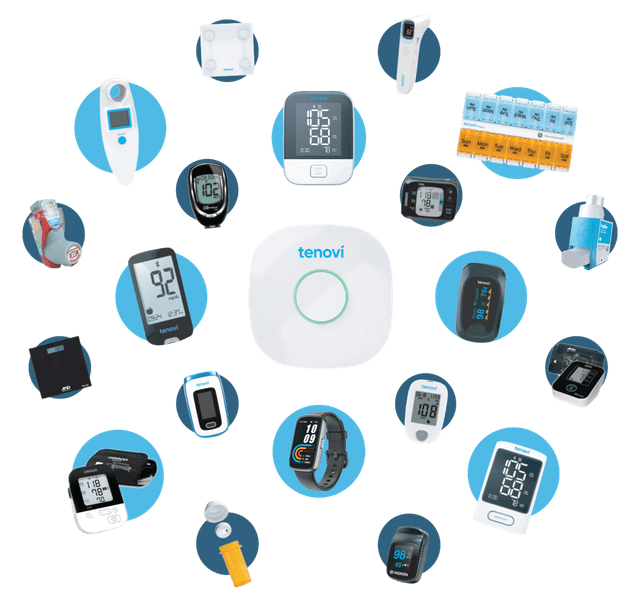
- Are devices cellular-enabled (no patient Wi-Fi, smartphone, or Bluetooth required)?
- What is the device form factor and patient usability profile?
- Does the vendor support the device categories your clinical objectives require?
EHR Integration
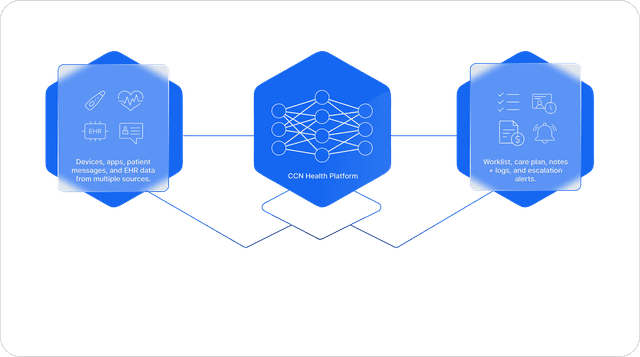
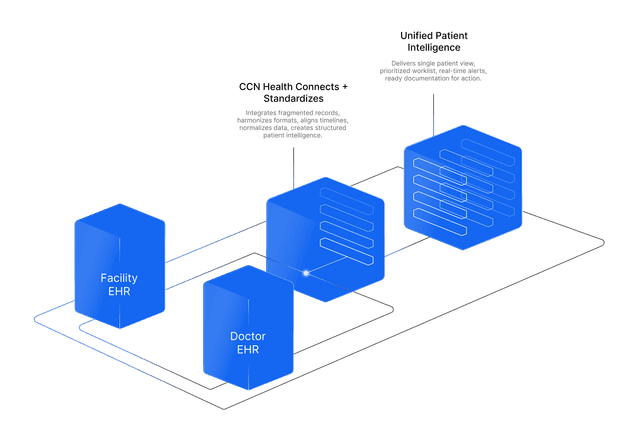
- Does the vendor integrate with your EHR system?
- What integration method is used (HL7, FHIR, API, manual)?
- How long does integration setup take?
- Does data flow bidirectionally or only from device to EHR?
Compliance and Billing Support
- Does the platform automatically track the 16-day reading threshold?
- Does it provide time-logging tools for CPT 99457/99458 documentation?
- Can it generate billing reports that align with your claims workflow?
- Does it flag patients at risk of falling below compliance thresholds?
Clinical Monitoring Capabilities
- Does the platform provide configurable alert thresholds?
- Does it offer clinical dashboards for trending and population-level views?
- Can clinical staff manage their patient panel efficiently within the platform?
- Does the vendor provide clinical monitoring support to augment your staff?
Scalability and Support
- Can the platform handle your projected patient volume growth?
- What onboarding and training support does the vendor provide?
- What is the vendor's track record with practices similar to yours?
- What are the contractual terms — per-patient pricing, device costs, minimum commitments?
Verify Payer Coverage
Before launching, confirm that your primary payers cover RPM billing. Medicare covers RPM under six CPT codes: 99453, 99454, 99445 (new 2026, 2–15 days), 99457, 99470 (new 2026, 10-min management), and 99458. Medicare Advantage plans generally follow original Medicare coverage guidelines but may have additional requirements. Commercial payers vary — some cover RPM, others do not, and coverage criteria differ.
Work with your billing team to verify coverage, confirm CPT code acceptance, and identify any payer-specific documentation requirements.
Phase 2: Configuration and Training (Weeks 2-3)
Configure EHR Integration
Work with your RPM vendor and EHR team to establish the integration between the RPM platform and your EHR. This typically involves:
- Creating an interface specification (data fields, transmission format, frequency)
- Setting up the connection (HL7 feed, FHIR API, or other method)
- Mapping RPM data fields to the appropriate locations in the patient's chart
- Testing the data flow with sample records
- Validating that data appears correctly in the EHR
Most EHR integrations take 2-3 business days to go live. Start this process as early as possible since it is often the longest lead-time item in the implementation.
Establish Clinical Protocols
Define your monitoring protocols before enrolling patients. Protocols should cover:
Alert Thresholds What vital sign values trigger an alert? For blood pressure, a common configuration is an alert for systolic readings above 180 mmHg or below 90 mmHg. For weight (heart failure patients), an alert for a gain of more than two pounds in one day or five pounds in one week. Define thresholds based on clinical guidelines and your patient population.
Escalation Procedures When an alert fires, what happens? Define the escalation chain: which clinical staff member responds first, when the supervising physician is notified, what patient contact is required, and how interventions are documented.
Routine Review Cadence How often does clinical staff review non-alert data? Daily review of all incoming data is ideal but may not be practical for large patient panels. At minimum, establish a cadence that ensures no patient goes more than 48-72 hours without having their data reviewed.
Patient Communication Protocols How and when does clinical staff communicate with RPM patients? Define the frequency and method of check-in calls (which also satisfy the interactive requirement for CPT 99457), the process for discussing out-of-range readings, and the documentation requirements for each interaction.
Train Clinical Staff
Clinical staff training should cover:
- Platform operation — How to navigate the RPM monitoring platform, review patient data, acknowledge alerts, and document clinical time
- Monitoring protocols — Alert thresholds, escalation procedures, and routine review processes
- Patient communication — How to conduct effective RPM check-in calls, discuss readings, reinforce adherence, and document interactions
- Time documentation — How to accurately log clinical time with date, duration, and description for CPT 99457/99458 billing
- Device troubleshooting — Common patient questions about device use and basic troubleshooting for connectivity or reading issues
Train Billing Staff
Billing staff need to understand:
- CPT code hierarchy — 99453 (one-time setup) → 99454 or 99445 (monthly device/data) → 99457 or 99470 (clinical time) → 99458 (additional 20 min, add-on to 99457 only)
- Billing requirements — 16+ days → 99454, 2–15 days → 99445; 20+ min → 99457, 10–19 min → 99470; documentation standards for all codes
- 2026 mutual exclusivity — 99454/99445 cannot be billed together; 99457/99470 cannot be billed together
- Claims submission — How to generate and submit RPM claims using your existing billing workflow
- Denial management — Common denial reasons and how to address them (missing physician order, insufficient reading days, incomplete documentation)
Prepare Patient Enrollment Materials
Develop or adapt the following materials for patient enrollment:
- Patient consent form — Covering participation agreement, single-provider billing acknowledgment, and financial responsibility
- Patient education guide — Simple instructions on device use, when to take readings, and who to call with questions
- Physician order template — Standardized order form specifying the chronic condition, monitoring type, and clinical rationale
Phase 3: Pilot Launch (Weeks 3-4)
Enroll Pilot Patients
Begin enrolling your initial 10-20 pilot patients. For each patient:
- Physician order — Obtain a signed RPM order specifying the chronic condition and monitoring type
- Patient consent — Review the program with the patient, answer questions, and obtain documented consent
- Device setup — Provision the device, configure it for the patient, and provide education on use (this visit satisfies CPT 99453)
- Care plan notation — Document the RPM enrollment in the patient's care plan
- Platform setup — Ensure the patient is active in the monitoring platform with appropriate alert thresholds configured
Activate Monitoring
Once pilot patients are enrolled and devices are distributed, activate your monitoring workflows:
- Assign enrolled patients to clinical staff members for daily data review
- Confirm that data is flowing from devices to the monitoring platform (and to the EHR if integration is live)
- Begin tracking reading compliance against the 16-day threshold
- Initiate the first round of patient check-in calls within the first week
First-Week Checklist
During the first week of your pilot, validate the following:
- Device data is transmitting successfully for all enrolled patients
- Data appears correctly in the RPM platform and EHR (if integrated)
- Alert thresholds are firing appropriately for out-of-range readings
- Clinical staff can navigate the platform, review data, and document time
- Patients understand how to use their devices and are recording readings
- Time documentation is being captured in the format required for billing
- Billing team can generate claims from the documented RPM activity
Managing the Pilot Period
The pilot period (typically 2-4 weeks) is your opportunity to identify and resolve workflow issues before scaling. Common pilot findings include:
- Patient engagement gaps — Some patients stop using devices within the first week. Proactive outreach within 48 hours of a missed reading dramatically improves retention.
- Documentation gaps — Clinical staff may perform care coordination work but forget to log their time. Build time-logging reminders into the workflow.
- Alert fatigue — If thresholds are set too aggressively, clinical staff become overwhelmed by alerts. Adjust thresholds based on pilot data.
- Device issues — A small percentage of devices may have connectivity problems or patient usability issues. Identify these early and replace or troubleshoot.
Phase 4: Scaling and Optimization (Week 4+)
Expand Enrollment
Once your pilot workflows are validated, begin scaling enrollment:
- Week 4: Expand to 30-50 patients by adding your next-highest-acuity chronic disease patients
- Ongoing: Scale toward your target patient volume, incorporating additional condition categories and adjusting staffing and workflows as needed
Scale at a pace that maintains workflow quality. Enrolling too many patients before workflows are solid leads to engagement drops, billing gaps, and staff burnout.
Monthly Performance Tracking
Track these metrics monthly to identify optimization opportunities:
Billing Metrics
- 16-day compliance rate (target: 80%+ of enrolled patients)
- CPT 99454 billing rate (percentage of enrolled patients billed monthly)
- CPT 99457 billing rate (should be roughly equal to 99454)
- CPT 99458 capture rate (often underbilled — look for undocumented clinical time)
- Total RPM revenue vs. target
Clinical Metrics
- Average readings per patient per month
- Alert volume and response time
- Patient engagement trend (improving, stable, or declining over time)
- Clinical interventions triggered by RPM data
Operational Metrics
- Staff time per patient per month
- Device replacement/failure rate
- Patient enrollment velocity
- Patient attrition rate
Optimize Revenue Capture
The most common revenue leakage points in RPM programs are:
- Patients falling below 16 days — Implement mid-month outreach for patients with fewer than 10 readings by day 15
- Underbilling CPT 99458 — Review time logs for patients with 40+ minutes of clinical time who were only billed 99457
- Missing physician orders — Automate order renewal reminders to prevent lapses
- Incomplete documentation — Audit time logs monthly for entries missing date, duration, or activity descriptions
Add Complementary Programs
Once your RPM program is running smoothly, consider adding complementary Medicare programs for qualifying patients:
- CCM for patients with 2+ chronic conditions who need care coordination
- BHI for patients with co-occurring behavioral health diagnoses
- PCM for patients with a single high-complexity chronic condition
Stacking programs for qualifying patients can increase per-patient revenue significantly while providing more comprehensive care.
Common Implementation Mistakes to Avoid
Starting Too Big
Practices that try to enroll 100+ patients on day one invariably encounter workflow problems that compound at scale. Start with 10-20 patients, validate everything, and then scale.
Treating RPM as a Technology Project
RPM is a clinical program that uses technology, not a technology project with clinical implications. Implementation must be led by clinical and operational leadership, not the IT department. Technology configuration is one step in a much larger workflow design process.
Neglecting Patient Engagement
Distributing devices without a patient engagement strategy leads to rapid disengagement. Build proactive outreach, automated reminders, and regular patient communication into your program from day one.
Underinvesting in Staff Training
Clinical staff who are not confident in the monitoring platform, escalation procedures, and documentation requirements will underperform. Allocate adequate training time before launch and provide ongoing coaching during the pilot phase.
Failing to Track Metrics
Without monthly performance tracking, revenue leaks and engagement drops go undetected until they become systemic problems. Establish your metrics dashboard before launching and review it at least monthly.
Conclusion
Launching an RPM program is a 30-day process that, when executed with discipline, creates a sustainable new revenue stream while improving chronic disease outcomes for your patient population. The keys are structured planning, careful vendor selection, thorough staff training, a controlled pilot phase, and data-driven scaling.
The financial opportunity is clear: an estimated ~$160 per patient per month in recurring revenue, with the potential to stack RPM alongside CCM and other programs for qualifying patients. But the clinical opportunity is equally compelling — continuous monitoring, earlier intervention, and proactive care that reduces hospitalizations and improves quality of life for the patients who need it most.
Disclaimer: This article is for informational purposes only and does not constitute medical, legal, or billing advice. CPT code reimbursement amounts are estimates based on CMS published fee schedules and may vary by region, payer, and clinical circumstances. Always consult qualified healthcare and billing professionals for guidance specific to your practice.
Let's figure this out together
We work closely with every client to find the right approach for their practice. Think of us as your partner, not just a platform.
Topics
Your Partner in Chronic Care
We love working closely with our clients to find the best solutions. Let us help guide you through the complicated stuff.
Why It Matters
Key Benefits
See how this approach drives measurable improvements across your organization.
Fast Time to Revenue
A structured 30-day implementation process means practices can begin generating RPM revenue within 45 days of making the decision to launch.
Recurring Income
Once enrolled, each RPM patient generates an estimated ~$160/month in recurring Medicare revenue through four billable CPT codes.
Scalable Growth
Starting with 10-20 pilot patients and scaling to hundreds creates a predictable growth trajectory without proportional overhead increases.
Compliance Built In
Automated tracking of reading days, clinical time, and documentation requirements reduces audit risk and claim denials from day one.
Clinical Impact
Continuous monitoring of high-acuity patients enables earlier intervention, reducing hospitalizations and improving chronic disease outcomes.
Continue Reading
Related Articles
Explore more insights on this topic.
In-House RPM: Why Practices Are Bringing Monitoring In-House
More practices are choosing to run Remote Patient Monitoring with their own employed staff instead of contracting the work out. Three forces are driving the shift: program economics that favor keeping the reimbursement, software that automates the daily workload, and a proposed CMS rule that would require practice-employed staff for RPM and RTM starting in 2027. Here is the full picture, including when a partner still makes sense.
RPM for Small & Independent Practices: Getting Started Without a Big Team
Small and independent practices can launch successful RPM programs without dedicated teams — starting with as few as 10-20 pilot patients and scaling at their own pace using turnkey vendor support and existing clinical staff.
RPM Revenue Guide: How Much Can Your Practice Earn?
A detailed breakdown of estimated RPM revenue per patient per month — including CPT code reimbursement, volume-based projections, program stacking with CCM and BHI, and strategies to maximize billing capture.
Common Questions
Frequently Asked Questions
Get answers to the most common questions about this topic.
Most practices can launch an RPM program within 30 days using a structured implementation process. Weeks 1-2 focus on vendor selection, EHR integration setup, and device procurement. Weeks 2-3 cover staff training, workflow configuration, and pilot patient identification. Weeks 3-4 involve patient enrollment, device distribution, and monitoring protocol activation. Some complex EHR integrations may extend this timeline slightly, but practices should target first-patient enrollment within 30 days to maintain organizational momentum.
Start with 10-20 patients for your initial pilot. Choose patients with high clinical acuity — such as those with uncontrolled hypertension, heart failure, or diabetes — who will benefit most from continuous monitoring. A small pilot allows your team to test workflows, identify process gaps, and build confidence before scaling. Most practices expand to 50-100 patients within 90 days of initial launch, then continue growing from there. Avoid the temptation to enroll too many patients too quickly before your workflows are validated.
Evaluate RPM vendors on five core criteria: (1) Device quality — FDA-cleared, cellular-enabled devices that transmit data automatically without Wi-Fi, apps, or Bluetooth. (2) EHR integration — the platform should integrate with your existing EHR via HL7/FHIR interfaces. (3) Compliance automation — automated tracking of the 16-day reading threshold, clinical time logging, and documentation requirements. (4) Clinical support — dedicated monitoring staff or clinical oversight capabilities to augment your team. (5) Scalability — the platform should handle growing patient volumes without proportional increases in administrative overhead.
EHR integration is strongly recommended for clinical workflow efficiency and care continuity. When RPM data flows directly into the patient's EHR record, clinicians can review vital sign trends alongside other clinical documentation without switching platforms. Integration also eliminates manual data entry, reduces transcription errors, and supports audit compliance. Most RPM vendors offer integrations with major EHR systems — including PointClickCare, ALIS, athenahealth, Epic, and others — via HL7 or FHIR interfaces. Most integrations go live within 2-3 business days.
The most common failure point is inadequate patient engagement management. Practices that enroll patients, distribute devices, and then take a passive approach to monitoring often see 16-day compliance rates drop below billable thresholds. Successful RPM programs actively manage patient engagement: automated reminders when readings are missed, proactive outreach to patients falling behind, clinical check-in calls that satisfy the interactive requirement for CPT 99457, and early intervention when engagement trends suggest a patient may disengage. Programs that treat patient engagement as an ongoing operational priority rather than a one-time enrollment activity consistently outperform.
Still have questions? We love helping practices figure this out — no pressure, just real answers.

Your Partner in Chronic Care
We're Here to Guide You Every Step of the Way
RPM, CCM, and chronic care management can get complicated. We work closely with every client to figure out the best solutions for their practice.